


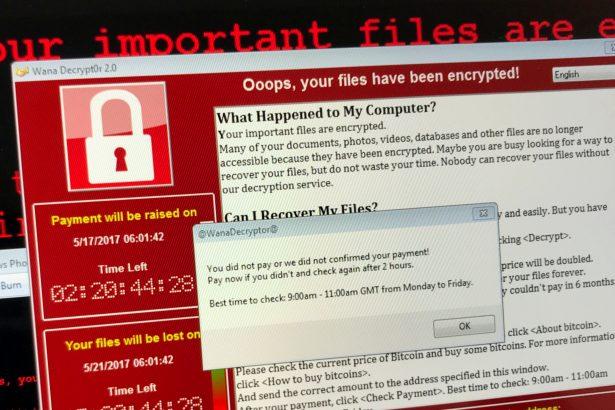
SRC Ransomware is a pernicious cyber threat that encrypts files on an infected system, rendering them inaccessible until a ransom is paid. This type of malware is part of a growing wave of ransomware attacks that target individuals, businesses, and institutions, often demanding substantial sums of money in exchange for the decryption key. Understanding how SRC Ransomware operates, its consequences, and the steps needed for removal and prevention is crucial for safeguarding your digital assets.
Actions and Consequences of SRC Ransomware
SRC Ransomware typically infiltrates a system through phishing emails, malicious attachments, compromised websites, or software vulnerabilities. Once activated, it encrypts a wide range of file types, including documents, photos, and databases, using a robust encryption algorithm. Victims are then presented with a ransom note, often in a text file or on the desktop, demanding payment in cryptocurrency, such as Bitcoin, for the decryption key.
The consequences of an SRC Ransomware infection can be devastating:
- Data Loss: Without the decryption key, the encrypted files remain inaccessible, potentially leading to significant data loss.
- Financial Impact: Paying the ransom does not guarantee file recovery and can lead to substantial financial losses.
- Operational Disruption: Encrypted files can disrupt business operations, causing downtime and productivity losses.
- Security Risks: Paying the ransom encourages cybercriminals and funds further illicit activities.
The Ransom Note
The text of the ransom note generated by SRC Ransomware is:
‘::: Greetings :::
Little FAQ:
.1.
Q: Whats Happen?
A: Your files have been encrypted. The file structure was not damaged, we did everything possible so that this could not happen.
.2.
Q: How to recover files?
A: If you wish to decrypt your files you will need to pay us.
.3.
Q: What about guarantees?
A: Its just a business. We absolutely do not care about you and your deals, except getting benefits. If we do not do our work and liabilities – nobody will cooperate with us. Its not in our interests.
To check the ability of returning files, you can send to us any 2 files with SIMPLE extensions(jpg,xls,doc, etc… not databases!) and low sizes(max 1 mb), we will decrypt them and send back to you. That is our guarantee.
.4.
Q: How to contact with you?
A: You can write us to our mailbox: RestoreBackup@cock.li
Or you can contact us via TOX: –
You don’t know about TOX? Go to hxxps://tox.chat
.5.
Q: How will the decryption process proceed after payment?
A: After payment we will send to you our scanner-decoder program and detailed instructions for use. With this program you will be able to decrypt all your encrypted files.
.6.
Q: If I don t want to pay bad people like you?
A: If you will not cooperate with our service – for us, its does not matter. But you will lose your time and data, cause only we have the private key. In practice – time is much more valuable than money.
:::BEWARE:::
DON’T try to change encrypted files by yourself!
If you will try to use any third party software for restoring your data or antivirus solutions – please make a backup for all encrypted files!
Any changes in encrypted files may entail damage of the private key and, as result, the loss all data.’
Detection Names and Similar Threats
Cybersecurity experts and antivirus programs may identify SRC Ransomware under various names, such as:
- Ransom.SRC
- Trojan.Ransom.SRC
- Win32:SRC-Ransom
Similar ransomware threats include:
- WannaCry: Known for its widespread impact and use of EternalBlue exploit.
- Petya/NotPetya: Encrypts the Master File Table (MFT) or overwrites the Master Boot Record (MBR).
- Locky: Distributed through malicious email attachments and encrypts a variety of file types.
- CryptoLocker: One of the early and notorious ransomware variants that demanded Bitcoin payments.
Comprehensive Removal Guide for SRC Ransomware
Step 1: Isolate the Infected System
- Disconnect from the Network: Immediately disconnect the infected device from the internet and any local network to prevent the ransomware from spreading.
- Power Down: If you cannot isolate the device, power it down to halt the encryption process.
Step 2: Boot in Safe Mode
- Windows Safe Mode: Restart the computer and press F8 (or Shift + F8) before Windows loads. Select “Safe Mode with Networking.”
- macOS Safe Boot: Restart your Mac and hold down the Shift key during boot-up.
Step 3: Remove Temporary Files
- Windows Disk Cleanup: Use the Disk Cleanup tool to remove temporary files that might harbor malicious components.
- macOS Storage Management: Use the “Manage” option under the Apple menu to clean temporary files.
Step 4: Disable Suspicious Startup Programs
- Windows Task Manager: Open Task Manager (Ctrl + Shift + Esc) and disable suspicious startup programs under the “Startup” tab.
- macOS Login Items: Go to System Preferences > Users & Groups > Login Items and remove suspicious entries.
Step 5: Restore from Backup
If you have a recent backup, restore your system to a point before the ransomware infection. Ensure the backup is clean and not corrupted by the malware.
Step 6: Use Built-in System Tools
- Windows System Restore: Access System Restore from Control Panel > System and Security > System > System Protection.
- macOS Time Machine: Use Time Machine to restore your Mac to a previous state.
Step 7: Professional Data Recovery
If backups are unavailable, consider professional data recovery services. Be cautious and ensure the service is reputable.
Step 8: Reinstall Operating System
As a last resort, reinstall your operating system to remove the ransomware completely. This will erase all data, so ensure important files are backed up (if possible).
Best Practices for Preventing Future Infections
- Regular Backups: Maintain regular backups of important files using external drives or cloud storage. Ensure backups are disconnected from the network after completion.
- Software Updates: Keep your operating system and software up to date with the latest security patches.
- Email Caution: Be wary of unsolicited emails and avoid opening attachments or clicking links from unknown sources.
- Security Software: Use reputable antivirus and anti-malware software to protect against threats.
- Network Security: Implement strong firewall settings and use VPNs to secure network connections.
- User Training: Educate employees and family members about cybersecurity best practices to reduce the risk of human error.
- Access Controls: Restrict administrative privileges and use standard user accounts for daily activities to minimize the impact of a potential infection.
Conclusion
SRC Ransomware is a formidable threat that can cause significant damage to individuals and organizations. By understanding its actions, knowing how to detect and remove it, and implementing robust preventive measures, you can safeguard your digital environment against this and similar cyber threats. Stay vigilant, maintain good cybersecurity hygiene, and always be prepared with regular backups and updates.

