www.itfunk.orgwww.itfunk.orgwww.itfunk.org
  • Home
  • Tech News
    Tech NewsShow More
    Automated Remediation Tools
    Google–Wiz Acquisition – Latest Cybersecurity News & Impact
    1 Min Read
    UHMC Cybersecurity Clinic for Small Businesses – Latest Cybersecurity News & Impact
    0 Min Read
    Telus Cybersecurity Incident – Latest Cybersecurity News & Impact
    0 Min Read
    Digital Lifeline: Why 2026 is the Year Healthcare Cybersecurity Became Critical
    5 Min Read
    Zero Trust: How a Security Idea Became a Blueprint
    41 Min Read
  • Cyber Threats
    • Malware
    • Ransomware
    • Trojans
    • Adware
    • Browser Hijackers
    • Mac Malware
    • Android Threats
    • iPhone Threats
    • Potentially Unwanted Programs (PUPs)
    • Online Scams
    • Microsoft CVE Vulnerabilities
  • How To Guides
    How To GuidesShow More
    7 Signs You’ve Been Hacked
    10 Min Read
    10 Best Ways to Stream Movies Online for Free Legally
    10 Best Ways to Stream Movies Online for Free Legally (2026 Guide)
    19 Min Read
    What to Do After a Cyber Attack: A Step-by-Step Business Guide
    7 Min Read
    5 Websites You Should Not Visit in 2026
    5 Websites You Should Not Visit in 2026
    13 Min Read
    Tasksche.exe Malware
  • Product Reviews
    • Hardware
    • Software
  • IT/Cybersecurity Best Practices
    IT/Cybersecurity Best PracticesShow More
    7 Signs You’ve Been Hacked
    10 Min Read
    UHMC Cybersecurity Clinic for Small Businesses – Latest Cybersecurity News & Impact
    0 Min Read
    Log Correlation Engine
    BISO – The Operational Bridge Between Cybersecurity and Business Lines
    0 Min Read
    Digital Lifeline: Why 2026 is the Year Healthcare Cybersecurity Became Critical
    5 Min Read
    Zero Trust: How a Security Idea Became a Blueprint
    41 Min Read
  • FREE SCAN
  • Cybersecurity for Business
Search
  • ABOUT US
  • TERMS AND SERVICES
  • SITEMAP
  • CONTACT US
© 2023 ITFunk.org. All Rights Reserved.
Reading: “Adobe Contract Agreement” Email Scam: Battling Email Fraud
Share
Notification Show More
Font ResizerAa
www.itfunk.orgwww.itfunk.org
Font ResizerAa
  • Tech News
  • How To Guides
  • Cyber Threats
  • Product Reviews
  • Cybersecurity for Business
  • Free Scan
Search
  • Home
  • Tech News
  • Cyber Threats
    • Malware
    • Ransomware
    • Trojans
    • Adware
    • Browser Hijackers
    • Mac Malware
    • Android Threats
    • iPhone Threats
    • Potentially Unwanted Programs (PUPs)
    • Online Scams
  • How To Guides
  • Product Reviews
    • Hardware
    • Software
  • IT/Cybersecurity Best Practices
  • Cybersecurity for Business
  • FREE SCAN
Follow US
  • ABOUT US
  • TERMS AND SERVICES
  • SITEMAP
  • CONTACT US
© 2023 ITFunk.org All Rights Reserved.
www.itfunk.org > Blog > Cyber Threats > Malware > “Adobe Contract Agreement” Email Scam: Battling Email Fraud
MalwareOnline Scams

“Adobe Contract Agreement” Email Scam: Battling Email Fraud

ITFunk Research
Last updated: April 17, 2026 7:41 pm
ITFunk Research
Share
"Adobe Contract Agreement" Email Scam: Battling Email Fraud
SHARE

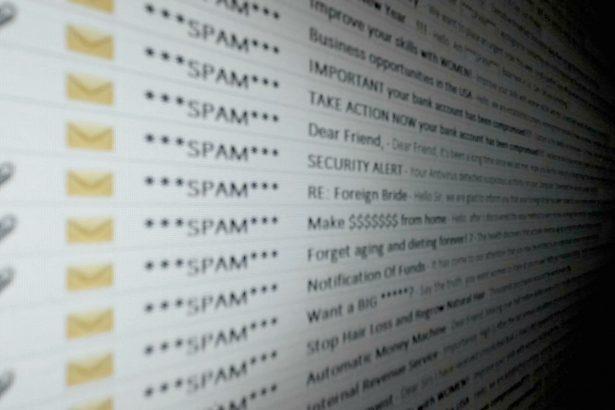
Phishing scams are deceptive schemes designed to trick individuals into revealing sensitive information or downloading malicious software by pretending to be legitimate entities. These scams often masquerade as official communications from well-known organizations or services, such as Adobe, to exploit trust and manipulate the recipient into taking harmful actions.

Contents
  • Nature and Purpose of Phishing Scams
  • Adobe Contract Agreement Email Scam
    • Similar Threats to Watch For
  • Comprehensive Removal Guide
  • Future Prevention Tips

Nature and Purpose of Phishing Scams

Phishing attacks generally use email or other digital communication methods to deceive recipients. These scams typically aim to steal personal information, login credentials, or financial details. In some cases, the goal is to install malware on the victim’s system, which can lead to data breaches, financial loss, or further security issues.

Phishing emails often appear to be from reputable sources, utilizing convincing language and branding to create a sense of urgency or legitimacy. The methods employed can include fake invoices, contract agreements, or security alerts designed to prompt the recipient into clicking malicious links or downloading infected attachments.

Adobe Contract Agreement Email Scam

The Adobe Contract Agreement email scam is a recent example of such phishing attacks. This scam involves an email claiming to be from Adobe, notifying the recipient of a supposed contract agreement. Here’s how it typically unfolds:

  1. Sender Information: The email often comes from a forged address that mimics legitimate Adobe email domains, such as adobe.com or a closely resembling variant.
  2. Content of the Email: The email purports to inform the recipient about an important contract agreement or document that requires immediate action. It may include a subject line such as “Adobe Contract Agreement” or “Important Document”.
  3. Instructions and Details: The email instructs the recipient to click on a link or download an attachment to view the contract. These links or attachments often lead to malicious websites or install malware on the recipient’s system.
  4. Purpose of the Scam: The primary objective is to trick the recipient into downloading malware or providing personal information. This could be for identity theft, financial fraud, or further distribution of malicious software.
  5. Common Triggers: The scam might target individuals who have recently interacted with Adobe services or those who are likely to engage with business contracts and documents.

Similar Threats to Watch For

Be vigilant about similar threats, such as:

  • Fake Invoices: Emails claiming to be overdue invoices from well-known companies.
  • Security Alerts: Notifications about suspicious activity on your accounts requiring immediate action.
  • Job Offers: Employment-related emails asking for personal information or directing you to suspicious websites.

Comprehensive Removal Guide

If you suspect that your system has been compromised by this scam, follow these steps to remove any associated malware:

  1. Disconnect from the Internet: This prevents further data transmission or malware activity.
  2. Enter Safe Mode: Restart your computer and enter Safe Mode to prevent malware from running. For Windows, press F8 during startup and select Safe Mode. For macOS, restart and hold the Shift key.
  3. Remove Suspicious Programs:
    • Windows: Go to Control Panel > Programs and Features, locate any unfamiliar programs, and uninstall them.
    • macOS: Open Finder > Applications, drag any unfamiliar applications to the Trash.
  4. Delete Malicious Files:
    • Windows: Use File Explorer to search for and delete any files related to the scam (e.g., files in the Downloads folder).
    • macOS: Use Finder to search for and delete any suspicious files.
  5. Run a Full System Scan: Download and install a reputable anti-malware tool like SpyHunter. Perform a full system scan to detect and remove any remaining threats.
  6. Update Security Software: Ensure your antivirus and anti-malware programs are up-to-date and run regular scans.
  7. Change Your Passwords: Update passwords for all accounts that may have been compromised. Use strong, unique passwords for each account.

Future Prevention Tips

  1. Be Skeptical: Always verify the sender’s email address and be cautious of unsolicited attachments or links.
  2. Enable Two-Factor Authentication: Add an extra layer of security to your online accounts.
  3. Educate Yourself: Stay informed about common phishing tactics and regularly review security practices.
  4. Use Reliable Anti-Malware Software: Keep your anti-malware programs updated to protect against new threats.

To safeguard your computer from malware and phishing threats, download SpyHunter today. It offers a free initial scan to help identify any potential threats on your system.

Download SpyHunter 5
Download SpyHunter for Mac

If you are still having trouble, consider contacting remote technical support options.
VerifyPrize.com
JDownloader Malware
Trojan:HTML/Redirector
“Microsoft Single-Use Code” Scam
SteamUnlocked Malware
TAGGED:" "phishing scam preventionAdobe Contract Agreement Scamanti-malware toolsEmail Fraud ProtectionHow to remove malwarePhishing email removalSpyHunter review

Sign Up For Daily Newsletter

Be keep up! Get the latest breaking news delivered straight to your inbox.
By signing up, you agree to our Terms of Use and acknowledge the data practices in our Privacy Policy. You may unsubscribe at any time.
Share This Article
Facebook Copy Link Print
Share
Previous Article Capmakingapp Adware: Battling Adware on macOS
Next Article Hawk Eye Ransomware: A Comprehensive Overview
Leave a Comment

Leave a Reply Cancel reply

Your email address will not be published. Required fields are marked *

Scan Your System for Malware

Don’t leave your system unprotected. Download SpyHunter today for free, and scan your device for malware, scams, or any other potential threats. Stay Protected!

Download SpyHunter 5
Download SpyHunter for Mac
✅ Free Scan Available • ⭐ Catches malware instantly
//

Check in Daily for the best technology and Cybersecurity based content on the internet.

Quick Link

  • ABOUT US
  • TERMS AND SERVICES
  • SITEMAP
  • CONTACT US

Support

Sign Up for Our Newesletter

Subscribe to our newsletter to get our newest articles instantly!


www.itfunk.orgwww.itfunk.org
© 2023 www.itfunk.org. All Rights Reserved.
  • ABOUT US
  • TERMS AND SERVICES
  • SITEMAP
  • CONTACT US
Welcome Back!

Sign in to your account

Username or Email Address
Password

Lost your password?

TERMS AND SERVICES