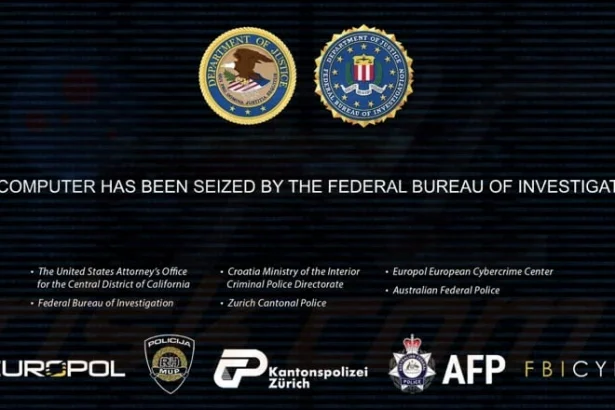
Ransomware is a type of malicious software that threatens to block access to a computer system or its data unless a ransom is paid. It has become one of the most notorious forms of cybercrime, targeting individuals and businesses alike. Upon infiltration, ransomware encrypts files, making them inaccessible to the user and demanding payment in exchange for the decryption key. The Property of the FBI ransomware is a particular strain that exemplifies the severe risks and consequences of ransomware attacks.
Threat Overview: Property of the FBI Ransomware
The Property of the FBI ransomware operates by exploiting vulnerabilities in a user’s system to gain access and encrypt files. This strain often masquerades as a legitimate alert from law enforcement agencies, claiming that illegal activity has been detected on the user’s computer. It typically infiltrates systems through malicious email attachments, unsafe downloads, or compromised websites. Once installed, it immediately begins encrypting files, often targeting documents, images, and other essential data. The encrypted files usually have a new extension added, such as .locked or similar, which indicates that they are now inaccessible.
After the encryption process is complete, the ransomware presents the user with a ransom note, usually in the form of a text file, which outlines the demands of the attackers. The note typically includes threats of permanent data loss if the ransom is not paid within a specified time frame, creating a sense of urgency for the victim. This tactic is designed to coerce individuals into paying the ransom, which may not guarantee the return of their files.
The Ransom Note
The ransom note left by Property of the FBI ransomware is a critical component of its operation. It usually includes alarming messages that threaten legal consequences, stating that the user’s computer has been used for illegal activities. The note may instruct the victim to pay a ransom, often in cryptocurrency, to a specified wallet address, and includes details on how to make the payment. Additionally, the note might claim that after the payment, the victim will receive a decryption tool. However, paying the ransom does not guarantee that victims will regain access to their files.
Text in the ransom note:
Federal Bureau of Investigation: Seized by Federal Authorities
Your computer has been seized by the FBI for involvement in illegal activities, including the distribution and possession of Child Pornography (CP).
All your files have been secured using a federal encryption protocol, based on RSA-2048 encryption, as part of an ongoing criminal investigation.
What does this mean?
Your files are now inaccessible and can only be recovered through formal federal proceedings. This action is part of a criminal investigation into your involvement in federal offenses.
Why has this happened?
Our cybersecurity systems detected illegal materials and unauthorized access to classified information on your system, leading to its seizure as evidence.
How can you recover your files?
To recover your files and cooperate with federal authorities, contact the Federal Bureau of Investigation immediately at a23bcd45e6fg@gmail.com for further instructions.
When contacting us, include your Case ID: – in the subject line.
As part of this process, you may decrypt up to two files free of charge. Ensure these files do not contain illegal content and are less than 1 MB in total size.
Important: Failure to comply with the FBI by May 20, 2024 will result in permanent data loss and further legal action against you.
Your full cooperation is required to resolve this matter and avoid escalation of charges.
Time before ransom is upped
–
Amount to Pay: $300
BTC Wallet: 3BKuiDHNSbdCdK8fHTUxCB4GRBiuKUrMzr
General Purpose and Infiltration Methods
The main purpose of ransomware, including the Property of the FBI variant, is to extort money from victims by threatening the loss of their valuable data. It generally infiltrates systems through phishing emails, where unsuspecting users may click on a link or download an attachment that appears legitimate. Once inside the system, the ransomware encrypts critical files, rendering them unusable. The threat posed by this malware is significant, as it can lead to data loss, financial harm, and severe emotional distress for the affected individuals or businesses.
Symptoms of Infection
Users may experience several symptoms indicating the presence of Property of the FBI ransomware, including:
- Inability to access certain files or programs.
- The appearance of ransom notes on the desktop or within folders.
- Unusual activity on the system, such as unexpected pop-ups or redirects.
- Slower system performance due to the encryption process running in the background.
Detection Names
To determine if Property of the FBI ransomware or similar malware is installed on a computer, users can look for the following detection names in their security software:
- Ransom.Win32.Locky
- Ransom.Win32.Crysis
- Ransom.Win32.LockCrypt
- Ransom.Win32.Reveton
- Ransom.Win32.CryLocker
Similar Threats
Users should also be aware of other ransomware variants that may pose similar risks, such as:
- CryptoLocker
- Cerber
- Jigsaw
- Dharma
Comprehensive Removal Guide
If you suspect that your system is infected with Property of the FBI ransomware, follow these detailed steps to remove it:
Step 1: Disconnect from the Internet
Immediately disconnect your computer from the internet to prevent further data transmission and additional malware downloads.
Step 2: Boot into Safe Mode
- Restart your computer.
- While it is booting up, press the F8 key (or Shift + F8 on some systems) to access the Advanced Boot Options menu.
- Select Safe Mode with Networking from the options.
Step 3: Use Anti-Malware Software
- Download a reputable anti-malware tool such as SpyHunter.
- Install the software and run a complete system scan to detect and remove the ransomware.
- Follow the on-screen instructions to quarantine or delete any identified threats.
Step 4: Restore Files from Backup
If you have backups of your files stored on an external drive or cloud service, restore them once you are sure that the ransomware has been removed from your system.
Step 5: Change Passwords
Change passwords for all accounts, especially those that may have been accessed during the infection.
Preventive Measures
To prevent future infections of ransomware, consider these proactive measures:
- Regular Backups: Regularly back up your data to an external hard drive or cloud storage service.
- Keep Software Updated: Regularly update your operating system and software to protect against vulnerabilities.
- Use a Firewall: Enable a firewall to block unauthorized access to your network.
- Educate Yourself: Be cautious of email attachments and links, especially from unknown sources.
Conclusion
Ransomware such as the Property of the FBI variant poses a significant threat to individuals and organizations. By understanding how this malware functions, recognizing the symptoms of infection, and taking preventive measures, users can protect themselves from potential harm. For comprehensive protection and peace of mind, consider downloading SpyHunter to scan your computer for free.
If you are still having trouble, consider contacting remote technical support options.