


www.itfunk.orgwww.itfunk.orgwww.itfunk.org
  • Home
  • Tech News
    Tech NewsShow More
    Zero Trust: How a Security Idea Became a Blueprint
    41 Min Read
    Cybersecurity Law Expiration Could Unleash New Ransomware Surge – Former FBI Official Sounds the Alarm
    8 Min Read
    Under the Hood of Microsoft’s May 2025 Patch Tuesday: The CLFS and WinSock Problem Microsoft Can’t Seem to Fix
    7 Min Read
    The Hidden Sabotage: How Malicious Go Modules Quietly Crashed Linux Systems
    6 Min Read
    Agentic AI: The Next Frontier in Cybersecurity Defense and Risk​
    5 Min Read
  • Cyber Threats
    • Malware
    • Ransomware
    • Trojans
    • Adware
    • Browser Hijackers
    • Mac Malware
    • Android Threats
    • iPhone Threats
    • Potentially Unwanted Programs (PUPs)
    • Online Scams
    • Microsoft CVE Vulnerabilities
  • How To Guides
    How To GuidesShow More
    Tasksche.exe Malware
    Nviqri Someq Utils Unwanted Application
    4 Min Read
    How to Deal With Rbx.fund Scam
    4 Min Read
    How to Jailbreak DeepSeek: Unlocking AI Without Restrictions
    4 Min Read
    Why Streaming Services Geo-Restrict Content?
    10 Min Read
  • Product Reviews
    • Hardware
    • Software
  • IT/Cybersecurity Best Practices
    IT/Cybersecurity Best PracticesShow More
    Zero Trust: How a Security Idea Became a Blueprint
    41 Min Read
    Under the Hood of Microsoft’s May 2025 Patch Tuesday: The CLFS and WinSock Problem Microsoft Can’t Seem to Fix
    7 Min Read
    Affordable Endpoint Protection Platforms (EPP) for Small Businesses
    5 Min Read
    Outlaw Malware: A Persistent Threat Exploiting Linux Servers
    4 Min Read
    CVE-2024-48248: Critical NAKIVO Backup & Replication Flaw Actively Exploited—Patch Immediately
    6 Min Read
  • FREE SCAN
  • Cybersecurity for Business
Search
  • ABOUT US
  • TERMS AND SERVICES
  • SITEMAP
  • CONTACT US
© 2023 ITFunk.org. All Rights Reserved.
Reading: Nnice Ransomware: Analysis and Removal Guide
Share
Notification Show More
Font ResizerAa
www.itfunk.orgwww.itfunk.org
Font ResizerAa
  • Tech News
  • How To Guides
  • Cyber Threats
  • Product Reviews
  • Cybersecurity for Business
  • Free Scan
Search
  • Home
  • Tech News
  • Cyber Threats
    • Malware
    • Ransomware
    • Trojans
    • Adware
    • Browser Hijackers
    • Mac Malware
    • Android Threats
    • iPhone Threats
    • Potentially Unwanted Programs (PUPs)
    • Online Scams
  • How To Guides
  • Product Reviews
    • Hardware
    • Software
  • IT/Cybersecurity Best Practices
  • Cybersecurity for Business
  • FREE SCAN
Follow US
  • ABOUT US
  • TERMS AND SERVICES
  • SITEMAP
  • CONTACT US
© 2023 ITFunk.org All Rights Reserved.
www.itfunk.org > Blog > Cyber Threats > Malware > Nnice Ransomware: Analysis and Removal Guide
MalwareRansomware

Nnice Ransomware: Analysis and Removal Guide

ITFunk Research
Last updated: January 15, 2025 8:06 pm
ITFunk Research
Share
Nnice Ransomware: Analysis and Removal Guide
SHARE

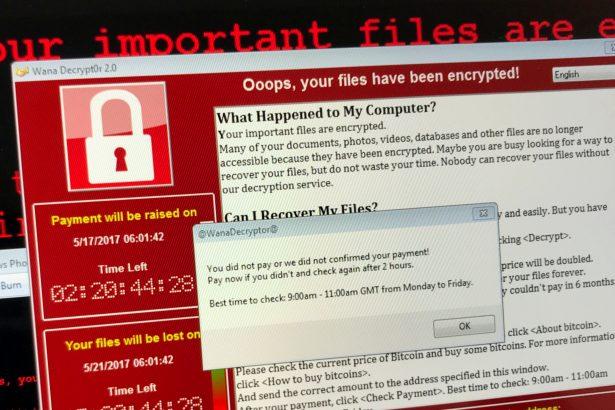
Nnice ransomware is a malicious program designed to encrypt files and extort victims by demanding payment for file decryption. This ransomware appends the “.nnice” extension to affected files and leaves a ransom note (“read_me.txt”) on the desktop, informing the victim about the encryption and instructing them to contact the attacker for a decryption tool. Here’s a detailed breakdown of the Nnice ransomware, along with actionable advice for its removal and future prevention.

Contents
Threat SummaryScan Your Computer for Free with SpyHunterRansom Note DetailsHow Nnice Ransomware SpreadsWhy You Should Not Pay the RansomSteps to Remove Nnice RansomwareScan Your Computer for Free with SpyHunterDownload and Install SpyHunterRun a Full System ScanRemove Detected ThreatsRestore Encrypted FilesPreventing Future Ransomware InfectionsConclusionScan Your Computer for Free with SpyHunter

Threat Summary

AttributeDetails
NameNnice Ransomware
Threat TypeRansomware, Crypto Virus, File Locker
Encrypted File Extension.nnice
Ransom Note File Nameread_me.txt
Associated Email Addressmaxfromhim@gmail.com
Detection NamesAvast: Win32:RansomX-gen [Ransom], Combo Cleaner: Gen:Heur.Ransom.Imps.3, ESET-NOD32: A Variant Of MSIL/Filecoder.Chaos.A, Microsoft: Ransom:MSIL/FileCoder.AD!MTB
Symptoms of InfectionInaccessible files with “.nnice” extension, ransom note displayed, desktop wallpaper changed, and ransom demanded (usually in cryptocurrency).
DamagePermanent encryption of files, potential installation of other malware or password stealers.
Distribution MethodsPhishing emails, malicious attachments, torrent websites, compromised advertisements, and infected USB drives.
Danger LevelHigh

Remove annoying malware threats like this one in seconds!

Scan Your Computer for Free with SpyHunter

Download SpyHunter now, and scan your computer for this and other cybersecurity threats for free!


Download SpyHunter 5
Download SpyHunter for Mac

Ransom Note Details

The ransom note, named read_me.txt, states:

"Hello, all your files have been encrypted and you can't decrypt this without the special file. Contact: maxfromhim@gmail.com."

Additionally, the desktop wallpaper is changed to display a vulgar ransom demand, emphasizing the attacker’s insistence on payment.


How Nnice Ransomware Spreads

  1. Phishing Emails: Fraudulent emails containing malicious attachments or links are the most common vector.
  2. Malicious Websites: Visiting compromised or fake websites can trigger ransomware downloads.
  3. Pirated Software: Cracks, keygens, or illegal software downloads often carry ransomware payloads.
  4. Exploited Vulnerabilities: Outdated software or operating systems are prime targets for attackers.
  5. Malvertising: Clicking on malicious ads can silently deliver ransomware to your system.
  6. Infected USB Drives: Using compromised external devices can also spread ransomware.

Why You Should Not Pay the Ransom

Paying the ransom is not recommended because:

  • No Guarantee: Attackers may not provide the decryption tool even after payment.
  • Encourages Crime: Payment incentivizes cybercriminals to continue their activities.
  • Potential Risks: Decryption tools from attackers might contain additional malware.

Steps to Remove Nnice Ransomware

Remove annoying malware threats like this one in seconds!

Scan Your Computer for Free with SpyHunter

Download SpyHunter now, and scan your computer for this and other cybersecurity threats for free!

Download SpyHunter 5
Download SpyHunter for Mac

SpyHunter is a powerful anti-malware tool capable of detecting and removing ransomware like Nnice. Follow these steps:

Download and Install SpyHunter

  • Download the software.
  • Install it by following the on-screen instructions.
Download SpyHunter 5
Download SpyHunter for Mac

Run a Full System Scan

  • Open SpyHunter and initiate a full scan.
  • The software will detect Nnice ransomware and any associated threats.

Remove Detected Threats

Click on “Fix Threats” to remove Nnice ransomware and any additional malware.

Restore Encrypted Files

Unfortunately, SpyHunter does not decrypt files. You may attempt to restore files from backups or use third-party decryption tools if available.


Preventing Future Ransomware Infections

  1. Keep Software Updated: Regularly update your operating system and software to patch vulnerabilities.
  2. Use Reputable Security Software: Install and maintain robust antivirus and anti-malware programs like SpyHunter.
  3. Avoid Suspicious Emails: Do not open attachments or click on links in emails from unknown senders.
  4. Download from Trusted Sources: Avoid downloading software from unofficial or P2P sources.
  5. Backup Data Regularly: Maintain secure backups on an external drive or cloud storage.
  6. Enable Firewall Protection: Use a firewall to monitor and block unauthorized access.
  7. Educate Yourself: Stay informed about the latest cybersecurity threats and best practices.

Conclusion

Nnice ransomware is a serious cyber threat that encrypts files and demands payment for their restoration. Removing it quickly using SpyHunter is critical to minimize damage. By adhering to cybersecurity best practices, users can protect themselves from future infections. Prevention is the most effective defense against ransomware, so take proactive measures today to safeguard your digital assets.

Remove annoying malware threats like this one in seconds!

Scan Your Computer for Free with SpyHunter

Download SpyHunter now, and scan your computer for this and other cybersecurity threats for free!

Download SpyHunter 5
Download SpyHunter for Mac

You Might Also Like

Xmegadrive.com Redirects
Itsfuck.top Adware
Trojan.IcedID.ANJ
Reprucally.co.in Hijacker
SnakeDiskUSB Worm
TAGGED:.nnice extension.nnice extension ransomwarecybersecurity tipsencrypted file recoveryfile locker virushow to remove Nnicehow to remove Nnice ransomwaremalware removal toolsNnice encryptionNnice ransom noteNnice ransomwareNnice ransomware emailNnice removal guideNnice virusphishing email threatsprotect from ransomwareransom paymentransomware danger levelransomware decryptionransomware detection namesransomware encrypted filesransomware encryption attackransomware infectionransomware preventionransomware prevention tipsransomware protectionransomware removalransomware removal guideSpyHunterSpyHunter ransomware removal

Sign Up For Daily Newsletter

Be keep up! Get the latest breaking news delivered straight to your inbox.
By signing up, you agree to our Terms of Use and acknowledge the data practices in our Privacy Policy. You may unsubscribe at any time.
Share This Article
Facebook Copy Link Print
Share
Previous Article malicious website How to Remove Targetads-hub[.]top: The Complete Guide to Staying Safe Online
Next Article Removing Diagram.app Malware from macOS
Leave a Comment

Leave a Reply Cancel reply

Your email address will not be published. Required fields are marked *

Scan Your System for Malware

Don’t leave your system unprotected. Download SpyHunter today for free, and scan your device for malware, scams, or any other potential threats. Stay Protected!

Download SpyHunter 5
Download SpyHunter for Mac
✅ Free Scan Available • ⭐ Catches malware instantly
//

Check in Daily for the best technology and Cybersecurity based content on the internet.

Quick Link

  • ABOUT US
  • TERMS AND SERVICES
  • SITEMAP
  • CONTACT US

Support

Sign Up for Our Newesletter

Subscribe to our newsletter to get our newest articles instantly!


www.itfunk.orgwww.itfunk.org
© 2023 www.itfunk.org. All Rights Reserved.
  • ABOUT US
  • TERMS AND SERVICES
  • SITEMAP
  • CONTACT US
Welcome Back!

Sign in to your account

Username or Email Address
Password

Lost your password?