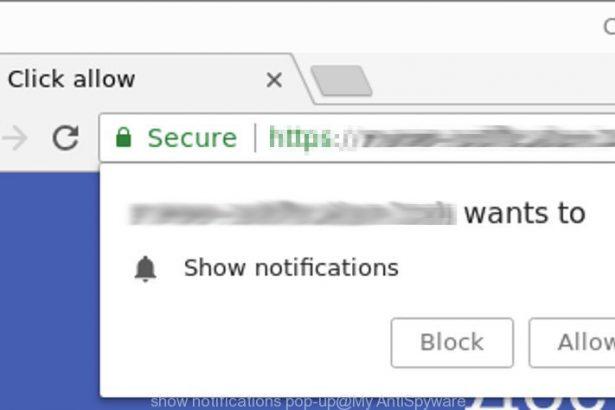
Valrelio.co.in is a deceptive website designed to trick users into enabling malicious browser notifications that can lead to scams, malware, or phishing pages.
Instead of providing real content, the site displays misleading prompts—often disguised as CAPTCHA verification tests—to pressure visitors into clicking “Allow” in their browser. Once permission is granted, the site begins delivering intrusive push notifications that promote fraudulent services, fake virus alerts, and other harmful content.
These notifications can appear even when the browser is closed, making the scam persistent and difficult to ignore.
| Threat Type | Rogue Website / Notification Scam |
|---|---|
| Associated Email | None known |
| Detection Names | Rogue.Notification.Site, Push Notification Scam, Adware Redirect |
| Symptoms | Fake CAPTCHA verification, browser notification spam, redirects to suspicious pages |
| Damage & Distribution | Exposure to phishing pages, fake antivirus scams, credential theft, malware downloads |
| Danger Level | Medium |
How Valrelio.co.in Tricks Users
Valrelio.co.in relies on a well‑known browser notification scam technique.
When you land on the page, it may show a message claiming that:
- Suspicious network activity was detected
- You must confirm you’re not a robot
- A CAPTCHA check is required to continue
The page displays a fake verification box and instructs visitors to click “Allow” to proceed.
But clicking “Allow” does not verify anything. Instead, it grants the site permission to send browser notifications directly to your device.
From that point forward, the site can bombard you with pop‑ups promoting scams and malicious links.
Full Text of the Valrelio.co.in Message
While the exact wording may vary, the scam usually displays messages similar to the following:
“Suspicious traffic detected from your network.
Click Allow to confirm you are not a robot.”
Other variations may include:
- “Press Allow to continue.”
- “Click Allow to verify you are human.”
- “Enable notifications to access the content.”
These messages are designed to imitate legitimate CAPTCHA systems, but real CAPTCHA tests never require notification permissions.
What Happens If You Fall for Valrelio.co.in
If you click Allow, the website gains permission to send push notifications directly to your browser.
These notifications often:
- Display fake virus warnings
- Promote fraudulent technical support services
- Advertise fake security tools
- Redirect to phishing pages collecting login credentials
- Lead to downloads of potentially unwanted programs (PUPs) or malware
Over time, these scams can result in:
- Stolen personal information
- Compromised online accounts
- Financial losses
- Additional malware infections
In many cases, users are repeatedly redirected to similar rogue websites through malicious ads, scam emails, or adware installed on the system.
Option 1: Manual Browser Hijacker Removal
Step 1: Uninstall Suspicious Software
For Windows:
- Press
Windows + R, typeappwiz.cpl, and press Enter. - Look for recently installed or unknown software.
- Select the suspicious program and click Uninstall.
- Follow the uninstaller’s prompts.
For Mac:
- Open Finder > Applications.
- Locate any unfamiliar apps you didn’t intentionally install.
- Drag them to the Trash.
- Right-click the Trash and select Empty Trash.
Step 2: Reset Each Web Browser Affected
Google Chrome:
- Go to chrome://settings/reset.
- Click Restore settings to their original defaults > Reset settings.
- Then, visit chrome://extensions and remove any suspicious add-ons.
- Change your search engine:
Settings > Search Engine > Manage search engines — remove unwanted entries and set a trusted one like Google.
Mozilla Firefox:
- Click the menu icon (three lines) > Help > More Troubleshooting Information.
- Click Refresh Firefox.
- After reset, check Add-ons and Themes and remove unwanted extensions.
- Navigate to Settings > Home/Search and revert changes to your preferred provider.
Microsoft Edge:
- Click menu (three dots) > Settings > Reset Settings > Restore settings to their default values.
- Open edge://extensions and remove any unfamiliar plugins.
- Reconfigure your homepage and search engine if needed.
Safari (Mac Only):
- Open Safari > Click Safari in the top menu > Clear History (select All History).
- Go to Preferences > Extensions, remove unknown entries.
- Under General, set your homepage.
- Under Search, revert to your preferred search provider.
Step 3: Check and Clean Your Hosts File
On Windows:
- Open Notepad as Administrator.
- Go to:
C:\Windows\System32\drivers\etc\hosts - Look for unknown IPs or domains — remove them.
- Save changes and reboot.
On Mac:
- Open Terminal.
- Run:
sudo nano /etc/hosts - Identify and remove hijacker entries.
- Press
Control + Oto save andControl + Xto exit.
Option 2: Automatic Removal Using SpyHunter
If you want a faster and safer solution — especially if the hijacker reinstalls after manual removal — use SpyHunter, a trusted anti-malware tool.
Step 1: Download SpyHunter
Visit the official download page: Download SpyHunter
Need help with the installation? Follow this page: SpyHunter Download Instructions
Step 2: Install and Launch the Program
- Run the installer and follow the steps for your OS.
- Open SpyHunter after installation.
Step 3: Perform a Full System Scan
- Click Start Scan Now.
- Wait while SpyHunter analyzes your computer for browser hijackers, malware, and other PUPs.
- Once the scan completes, click Fix Threats to eliminate them.
Step 4: Reboot and Recheck Your Browser
After cleaning, restart your device. Open your browser and check if your homepage and search settings are restored. If not, perform a quick browser reset using the manual steps above.
How to Prevent Future Infections
- Avoid downloading freeware from third-party sites.
- Use custom/advanced installation and deselect optional offers.
- Keep your browser and OS updated.
- Regularly scan your system with SpyHunter for proactive defense.
- Don’t click strange pop-ups or redirect links from unknown sources.
Conclusion
Valrelio.co.in is not a legitimate website. It is a notification-based scam page designed to manipulate users into allowing browser alerts that promote phishing schemes, fake security software, and malicious downloads.
The safest response is to close the page immediately without clicking anything. If you already allowed notifications, revoke the permission in your browser settings and run a security scan to ensure no adware or unwanted programs are present.
Staying cautious with unfamiliar CAPTCHA prompts and notification requests is one of the most effective ways to avoid scams like Valrelio.co.in.